
Key metrics decide whether your chat operation makes money or just makes conversation: median response time, revenue per message, and conversion rate from message to purchase. Faster replies help close more PPVs, revenue per message reflects pricing and pitching effectiveness, and conversion rate indicates offer success. Track those three first, before anything else on your dashboard.
TL;DR:
- Response time is the most critical metric, as a two-hour delay can cost more than a well-priced offer sent in two minutes.
- Focusing on revenue per message and conversion rate yields more actionable insights than measuring message volume alone.
- Segmenting fans by spend and recency helps prioritize high-value fans for faster responses and tailored offers.
- Coordinated chat teams with clear SLAs and staggered shifts improve capture of worldwide fan activity and increase sales.
- Using an agency for chat management offers scalable, reliable metrics tracking and can prevent the technical headaches of DIY solutions.
Auswertung chat daten OnlyFans, or chat data analysis for OnlyFans, means turning raw message logs into decisions about pricing, staffing, and fan targeting. It’s the practice of measuring what happens inside your DMs and using that to make more money, not just more conversation.
Here’s what to track and how to measure each one consistently:
If your biggest bottleneck is slow replies, prioritize response time. If fans open messages but don’t buy, focus on conversion rate and pricing. Use a minimum sample of 50 to 100 interactions before trusting any single number.
Numbers only matter once you act on them. Here’s a practical sequence for turning chat data into pricing and targeting decisions:
Pro Tip: Combine sentiment tags with spend tiers before writing your next PPV script. A “high spend, cooling off” fan needs a different message than a “new, enthusiastic” one, even if the price is identical.
Chat revenue is a staffing problem as much as a messaging one. Coordinated chat teams running three to six chatters per account provide round-the-clock coverage that captures fans across time zones, which is where a lot of missed PPV sales quietly disappear.
Set these operational benchmarks:
Productivity and quality trade off against each other. A chatter closing fast but sloppy deals will hurt retention even while hitting short-term numbers.
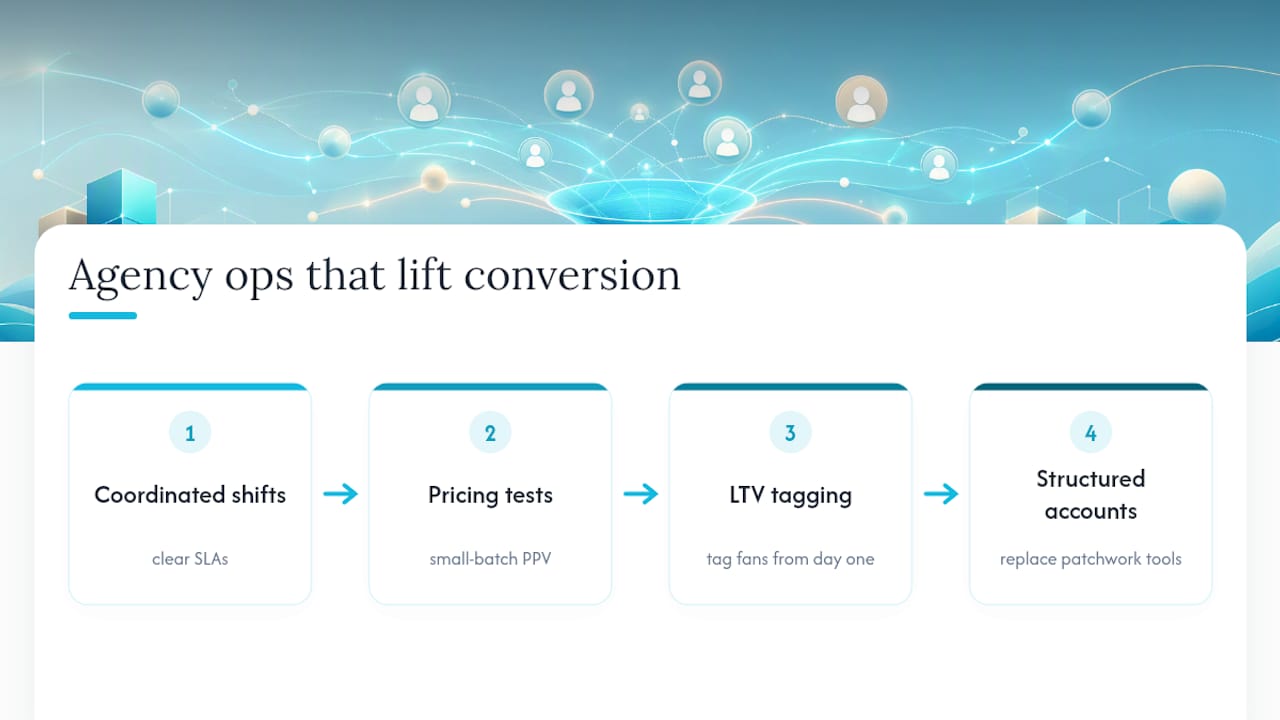
Running coordinated shifts with clear SLAs consistently lifts conversion more than any single script or price tweak. Agencies test PPV pricing in small batches and tag fans by lifetime value from day one. On the technical side, extension and scraper fragility is a constant maintenance cost, one reason many operations eventually shift toward structured account management instead of patchwork tools.
Every other chat metric eventually traces back to how fast you reply. A perfectly priced PPV sent two hours late still loses to a mediocre offer sent in two minutes. If you take one thing from this guide, check your median response time today. It’s the single fastest signal of where your revenue is leaking.
— Gjon
An agency service can be an alternative to piecing together scrapers, spreadsheets, and solo chatting for creators who’d rather have the numbers handled than hunt for them. Instead of maintaining fragile browser extensions or training a team from scratch, you can work with an agency that provides dedicated account managers and a 24/7 chat team organized around SLAs, chatter scorecards, and revenue attribution.
Hiring an agency pays off once your messaging volume or fan base outgrows what one person can respond to within a few minutes, which is usually the point where lost PPV sales start costing more than the management fee. Only-dreams also offers fan chat management pricing models built around your current scale, so you’re not locked into a structure sized for someone else’s account. If your response times or conversion rates have been slipping, get in touch through the Only-dreams site and ask what a managed chat team would look like for your account.
For readers who want to go deeper on the technical side, the of-chatter Chrome extension project documents how DOM scraping and MutationObservers work in practice, along with their maintenance headaches. The OnlyFans conversational analytics project shows conversation-level metrics like AHT and sentiment in a real dashboard build, useful groundwork if you’re planning custom tracking rather than a vendor tool.