
Publish one boundary policy today: state your response window, define what free versus paid tiers get, and enforce a clear escalation path for abuse. Turn on a welcome auto-reply this week, then run a 7-day DM audit before you touch anything else. This order matters because it protects your energy first and your highest-value conversations second, without sacrificing either.
TL;DR:
- Automating repetitive DMs with categorized templates can reduce daily message management from hours to under 30 minutes while maintaining personalized touches.
- Implementing a clear boundary policy with response windows, tier definitions, and escalation procedures helps prevent burnout and secures revenue streams.
- A layered moderation system using auto-filters, warnings, timeouts, and escalation logs reduces abusive behavior without over-relying on a single rule.
- Onboarding chat teams with tone guides, role-based access, and regular quality reviews ensures consistent communication and protects brand integrity.
- Tracking metrics such as response time, repeat offenders, and PPV conversion rates confirms that boundary policies support both safety and revenue growth.
“Grenzen im fanchat” translates to “boundaries in fan chat,” and in the creator economy it refers to the operational rules governing one-to-one and group messaging between creators (or their chat teams) and fans. Industry professionals usually call this fan chat governance or chat moderation policy, and it covers everything from response times to content limits to escalation protocols. For an established creator earning real money from subscriptions and pay-per-view messages, this isn’t a soft “self-care” concept. It’s an operational framework that determines whether your DMs generate revenue or burn out your team.
Here’s a policy template you can copy into your bio, welcome message, or membership onboarding flow today:
Keep the language on brand and warm. A policy that reads like a legal disclaimer feels cold; one that reads like a boundary a professional sets with clients feels normal, because that’s exactly what it is.
Start with an audit, not a guess. Pull a 7-day sample of your DM inbox and sort every message into categories: pricing questions, content requests, compliments, complaints, and abuse. In nearly every account Only-dreams has reviewed, the same pattern holds: a large majority of message volume is repetitive, low-value questions, while a smaller portion deserves a real, personal reply.
Here’s the process:
Automating the repetitive 80% can cut daily DM time from 2 to 4 hours down to under 30 minutes, which frees your team to focus on the conversations that actually convert.
Pro Tip: Insert small personal variables into automated replies, like a fan’s name or a reference to their last purchase. It keeps the message from reading like a bot, and it protects you from platforms that penalize obviously scripted spam.
Bringing a new chatter onto your account without a structured process is how brand voice gets diluted and security gets compromised. Build the onboarding checklist before you hire, not after.
This structure isn’t bureaucracy for its own sake. It’s what separates a chat team that scales safely from one that quietly damages a creator’s brand one unsupervised message at a time.
Effective moderation works in layers, not a single blunt rule. Automated filters catch spam, slurs, and obvious bot activity instantly. Human moderators handle anything that requires judgment: a fan who seems upset, an ambiguous request, or language that toes a line without crossing it clearly.
The recommended structure, drawn from TopChat’s moderation and safety guidance, looks like this:
Every incident needs a log entry: timestamp, actor, the specific reason for action, and the outcome. This record is what lets you spot a repeat offender before they become a real problem, and it’s what an appeals process needs to function fairly. Teams that track this consistently report meaningfully lower repeat-offense rates than those handling every incident case-by-case.
A policy nobody sees isn’t a policy. It’s a document sitting unused in a settings menu. Place your boundary language everywhere a fan might look before or after subscribing:
Consistency across every one of these touchpoints matters more than clever wording. Fans who see the same message in the bio, the pinned post, and the welcome DM read it as professional structure, not rejection. Fans who get silence in one place and a policy statement in another read the gap as inconsistency, and that’s what actually damages trust. Frame paid tiers and scheduled response windows as upgrades, not walls.
Boundaries only earn their keep if you can measure them. Track operational health and revenue side by side so you know whether a policy change helped or hurt.
| Metric type | What to track | Why it matters |
|---|---|---|
| Moderation | Median time-to-action, moderator response time | Shows how fast your team catches and resolves issues |
| Moderation | Removal rate, repeat offender rate | Flags whether your escalation rules actually deter bad behavior |
| Revenue | PPV conversion rate post-policy | Confirms boundaries aren’t suppressing sales |
| Retention | Subscriber retention by tier | Tests whether tiered access feels fair or punitive |
Run changes as a 4-week experiment. Adjust one variable, like response window language or a new automation trigger, and compare the four weeks before against the four weeks after. Two weeks isn’t enough data; a full month usually is.
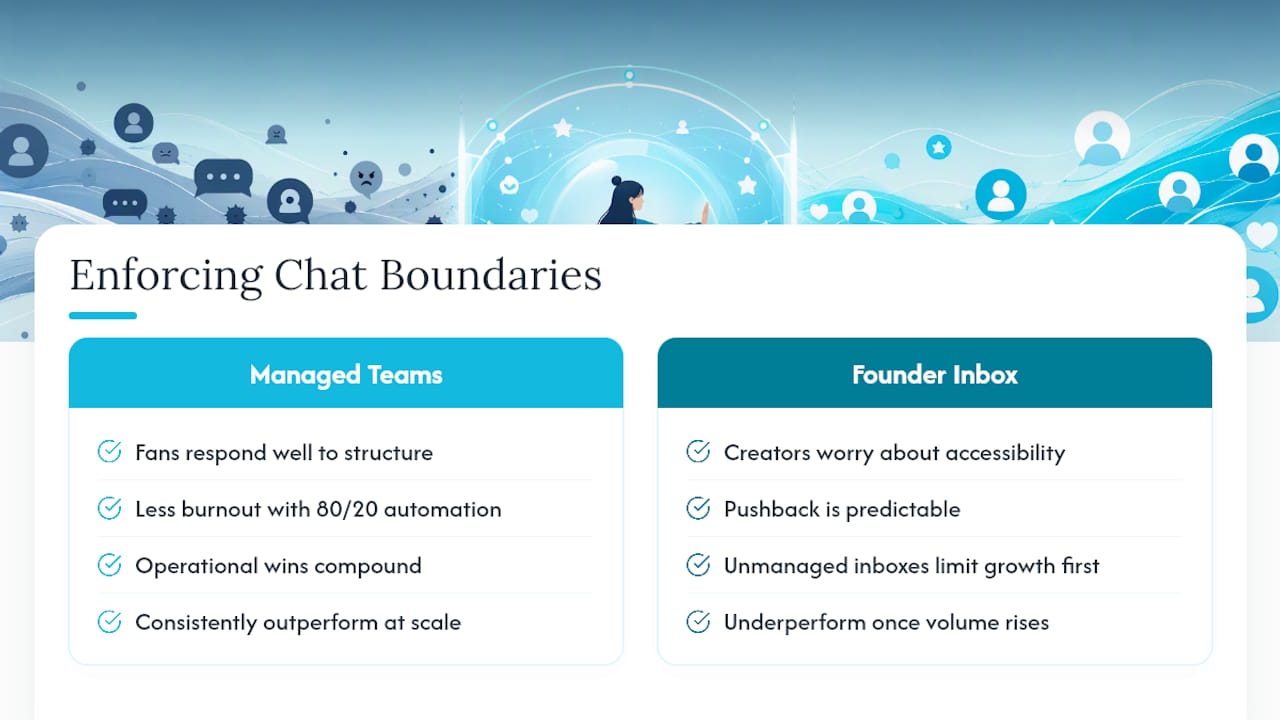
Managing chat operations across dozens of accounts teaches you that pushback is predictable. Creators worry a stated response window will make them seem less accessible, or that tiered access will alienate long-time fans. In practice, the opposite tends to happen: fans respond well to structure because it reads as professionalism, not distance.
The operational wins compound. Chat teams report less burnout once the 80/20 automation split is in place, and revenue holds steady or climbs because human attention goes where it actually converts. Managed chat teams that pair dedicated account managers with trained chatters consistently outperform ad hoc, founder-managed inboxes once volume passes a certain threshold. The lesson isn’t that boundaries limit growth. It’s that unmanaged inboxes limit growth first, and boundaries are what fix that.
— Gjon
Only-dreams is the alternative to managing this entire framework alone. Instead of spending weeks writing policy language, training chatters, and building escalation workflows from scratch, you get a trained chat team that already runs this exact system across dozens of established creator accounts.
On day one, Only-dreams implements your response-time policy, sets up comment-to-DM and welcome-message automation, and assigns trained moderators who follow a documented escalation path instead of improvising. You get a dedicated account manager, secure CRM access with role-based permissions (never shared passwords), and regular reporting on the exact metrics covered above: removal rate, response time, and PPV conversion by tier. Onboarding typically starts with an audit of your current DM volume, similar to the 7-day process outlined earlier, so the team knows your fan base before they send a single message. If you’re ready to see what a properly chatting agency versus self-managing your DMs actually looks like in practice, book a consult through the Only-dreams landing page and get a walkthrough of how the setup fits your account.
For deeper detail on the systems referenced above, review CreatorFlow’s guide to building a smart DM system and TopChat’s moderation best practices. On Only-dreams, see the guides on DM operations and PPV cadence and chat management pricing models.