
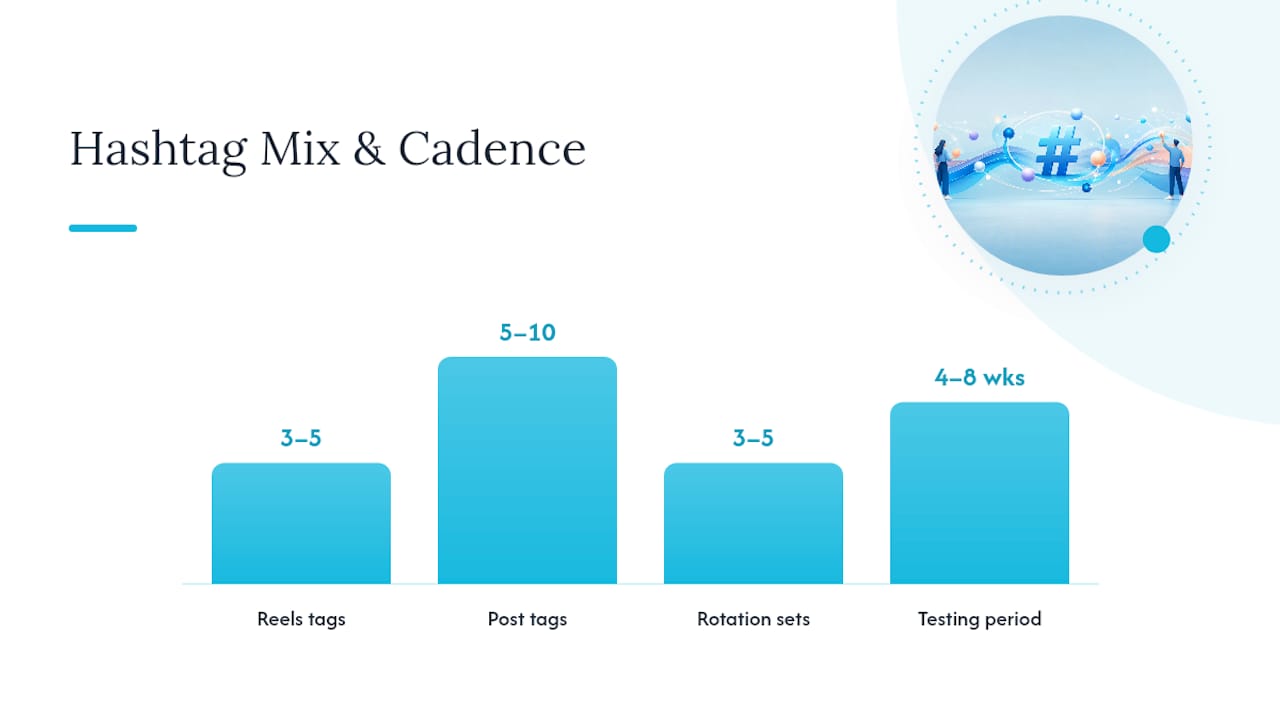
Use 3–5 focused hashtags that match your caption’s primary keyword plus one branded tag. That single rule covers the most common mistake creators make and gives you a faster path to discovery right now.
Your 5-step caption workflow:
Copy that checklist into your caption prep template and run it on your next post before reading further.
A focused, rotating hashtag strategy built on keyword-rich captions and niche-first tag selection consistently outperforms high-volume, generic tag lists for creator growth on Instagram.
| Point | Details |
|---|---|
| Use 3–5 tags for Reels, 5–10 for posts | Fewer, highly relevant tags outperform long generic lists and avoid spam signals. |
| Caption keywords come first | Hashtags confirm what your caption already says; a keyword-rich caption amplifies every tag you use. |
| Rotate three to five sets per pillar | Repeating identical tags signals spammy behavior; rotating sets keeps your content fresh to the algorithm. |
| Test over four to eight weeks | Track hashtag-sourced impressions, Saves, and Shares per set before deciding which tags to keep or retire. |
| Only-dreams manages this at scale | Dedicated account managers build, rotate, and audit hashtag pools monthly so creators can focus on content. |
Instagram no longer works like a hashtag directory. It functions as a semantic search engine, where captions, visual embeddings, and alt text all feed into how the platform categorizes and surfaces your content. Hashtags now act as contextual signals that confirm what your caption already says, rather than as the primary reach driver they once were.
That shift has a practical implication: a keyword-rich caption paired with three precise hashtags will outperform a thin caption stuffed with 30 generic tags. Instagram’s search and recommendation models read the full post, not just the tag list.
What hashtags still do well:
Saves and Shares now carry more algorithmic weight than Likes, so the goal is not just to appear in a hashtag feed but to land in front of people likely to save or share your post. Hashtags help you reach that audience; your content quality determines whether they act.
Caption placement wins for indexation speed. Putting hashtags in your caption ensures Instagram indexes them immediately when the post goes live. First-comment placement can look cleaner, but it introduces a small delay between publish time and full indexation, which matters most in the first hour when the algorithm decides initial distribution.
Placement rules by format:
Pro Tip: Add five blank lines between your caption text and your hashtags using the return key (or a period-return trick in the Instagram app). This collapses the tags behind a “more” prompt on mobile, keeping your caption clean without moving tags to the first comment and risking indexation delay.
The right mix matters more than the total count. A post with five well-chosen tags from different categories will consistently outperform one with twenty tags from the same popularity band.
The recommended portfolio for most creators: 1 branded + 2 niche + 1 mid-size + 1 optional trending or local tag.
Here is what each type does and when to use it:
A focused set of highly relevant hashtags combined with keyword-rich captions consistently outperforms long, generic lists. The recipes below are built on that principle. Swap individual tags to match your niche; keep the structure.

Recipe 1: Reels (3–5 tags)
Use your branded tag, one niche tag matching the Reel’s topic, and one mid-size tag. Example structure:
#[YourBrand] #[NicheTopic] #[MidSizeTopic]
Add a fourth tag only if a trending topic is directly relevant to the Reel’s content.
Recipe 2: Photo or carousel post (5–10 tags)
#[YourBrand] #[NicheTopic1] #[NicheTopic2] #[MidSizeTopic] #[BroaderTopic]
For educational carousels, add one or two keyword-specific tags that match the slide topic (e.g., #ContentCalendarTips for a calendar post).
Recipe 3: Brand-building post Lead with your branded tag, then two niche tags that describe your content pillar, then one mid-size tag. Keep the total at five. This set should stay consistent across brand-building posts so followers recognize and search your tag over time.
Recipe 4: Local event or promotion
#[YourBrand] #[CityName]Creator #[LocalNicheTag] #[EventType]
Swap one niche tag for a local tag and add the event type as a fifth tag if the post count is under 1M.
When to swap tags inside a set: Replace any tag whose top posts no longer match your content style. If the top posts on a tag page look nothing like yours, that tag is sending the wrong context signal. Swap it for a closer match and retest over two weeks.
The fastest practical workflow starts with Instagram’s own search bar, not a third-party tool. Native search gives you real-time post counts and shows you exactly what content ranks on each tag page.
Manual research workflow (10–20 minutes per content pillar):
Native Instagram search and Top-post audits remain the highest-fidelity signals for what actually works in a niche. Paid tools are useful for scale, but always validate their suggestions against manual checks.
When to add a generator or paid tool:
Filter every tool suggestion through two questions: Is this tag’s top content similar to mine? Has the tag been active in the last 30 days? If both answers are yes, it earns a spot in your shortlist.
Three tool tiers cover most creator needs: free native search, freemium generators, and paid analytics suites. Hashtag generators speed up ideation, but human filtering and manual Instagram checks remain necessary to confirm relevance.
Later is best for creators who want hashtag suggestions built into their scheduling workflow. The platform’s hashtag suggestion feature pulls related tags as you write your caption, and its analytics show which tags drove impressions on past posts. Later’s free tier covers basic scheduling; hashtag analytics sit behind a paid plan.
Tailwind suits creators focused on both Instagram and Pinterest who want bulk hashtag generation alongside post scheduling. Its “Hashtag Finder” suggests tags by category and flags overused ones. Tailwind offers a free trial; ongoing access requires a paid subscription.
Hashtagify is a dedicated hashtag research tool that shows trend direction, related tags, and influencer usage patterns. It is most useful when you want to understand whether a tag is growing or declining before committing to it. Hashtagify offers a limited free tier with deeper data behind a paid plan.
RiteTag provides real-time color-coded feedback on individual tags: green means the tag gets good engagement now, blue means it gets engagement over time, red means avoid it. It integrates directly with your browser and social media tools, making it the fastest option for rapid tag vetting. RiteTag offers a free trial.
Display Purposes is a free web tool that generates related hashtags from a seed keyword and filters out banned or spammy tags automatically. It is the quickest starting point for building a clean tag list from scratch, especially for creators new to hashtag research.
| Tool | Best for | Free tier | Key features |
|---|---|---|---|
| Later | Reels + posts with scheduling | Yes (basic) | Suggestions in caption editor, performance analytics |
| Tailwind | Bulk generation + scheduling | Trial only | Hashtag Finder, overuse flagging |
| Hashtagify | Trend direction research | Limited | Trend graphs, related tags, influencer data |
| RiteTag | Rapid single-tag vetting | Trial | Real-time color-coded feedback, browser integration |
| Display Purposes | Clean list generation from scratch | Yes (full) | Auto-filters banned tags, related tag clusters |
Publish similar posts with different hashtag sets and keep every other variable stable: caption length, post time, content format, and thumbnail. That is the core of a reliable hashtag test.
Testing protocol:
Metrics to track in Instagram Insights:
Spreadsheet columns to track:
| Column | What to record |
|---|---|
| Post date | Date published |
| Hashtag set | Set A or Set B (list the tags) |
| Hashtag impressions | From Instagram Insights |
| Total reach | From Instagram Insights |
| Saves | From Instagram Insights |
| Shares | From Instagram Insights |
| Profile visits | From Instagram Insights |
| Notes | Content type, posting time, any anomalies |
Run this process for four to eight weeks per content pillar. Monthly iteration keeps your sets current as tag popularity shifts.
Most hashtag mistakes fall into three categories: using too many tags, repeating the same set on every post, and using blocked or restricted tags. All three can reduce your reach or trigger content filters.
The top six rules:
Watch for shadowban signals. If your hashtag-sourced impressions drop to near zero across multiple posts while your follower reach stays normal, one or more of your tags may be restricted. Remove all current tags, post without them for one week, then reintroduce a clean set one tag at a time. Check each tag’s page manually before adding it back.
The answer is a folder structure with rotating sets and a clear update cadence. Research 15–20 candidate hashtags per content pillar, group them by volume, then build three to five rotating sets from that pool.
Recommended folder structure:
Naming convention: Use a short descriptor plus a date stamp. Example: Fitness_NicheHeavy_Apr2026. This lets you and any team member identify the set’s focus and freshness at a glance.
Creator workflow (solo):
Team workflow:
Pro Tip: Use a content management workflow to connect your hashtag sets directly to your posting calendar. Tag each scheduled post with its assigned hashtag set before publishing so you never accidentally reuse the same set two posts in a row.
Three clear indicators signal it is time to bring in outside help: your monthly income exceeds $3,000 and hashtag research is eating into content creation time; you manage more than three content pillars and cannot run consistent A/B tests; or your growth has plateaued despite regular posting and you lack the bandwidth to diagnose why.
Only-dreams takes a data-driven approach to hashtag work as part of its broader Instagram growth strategy. A dedicated account manager builds and maintains rotating hashtag pools for each content pillar, runs A/B tests across posting cycles, and updates sets monthly based on Insights data. The agency’s trained teams also handle fan engagement in the first 30 minutes after posting, which amplifies the reach that hashtags open up.
Vendor checklist when evaluating any managed service:
Pro Tip: Before signing with any agency, ask to see a sample hashtag audit report. A credible provider can show you which tags drove impressions on a past client’s posts and explain why they rotated specific sets out. If they cannot produce that, their process is not data-driven.
Creators who outsource hashtag strategy alongside advanced social media marketing typically free up two to four hours per week that they redirect into content production.
Most creators treat hashtag strategy as a one-time setup task. They research a list, paste it into every post for six months, and wonder why their reach stagnates. The real work is in the rotation and the monthly audit, not the initial research.
The single most consistent finding from testing hashtag sets across creator accounts is this: niche tags with under 500K posts almost always outperform broad tags for saves and profile visits, even when the broad tags generate higher raw impressions. Higher impressions from a broad tag rarely convert to the engaged followers who save your content and come back. A smaller, more targeted audience reached through a precise niche tag tends to behave better by every metric that actually matters to growth.
The other thing most guides skip: your caption does more work than your tags. When you write a caption that uses the same language your audience types into search, your hashtags become a confirmation layer, not the primary signal. Creators who improve their caption writing alongside their tag strategy see compounding gains. Those who only optimize tags hit a ceiling quickly.
Researching tags, rotating sets, running A/B tests, and updating pools monthly is a real time commitment. For creators earning $3,000 or more per month, that time has a measurable cost.
Only-dreams manages the full operational side of your Instagram presence: dedicated account managers build and rotate your hashtag pools, run monthly performance audits, and adjust sets when the algorithm shifts. Trained chat teams handle fan engagement in the critical first 30 minutes after every post, which directly amplifies the reach your hashtags open. Optional AI-enhanced marketing reduces your workload further while increasing distribution. You get a professional, data-driven hashtag strategy running in the background while you focus on content.
Ready to hand off the operational work? Visit Only-dreams to learn about managed account services and find out whether your account qualifies.