Synthesia leads for avatar-led explainer and training videos, Runway wins for cinematic B-roll and original visuals, and Canva or Adobe Firefly are the fastest starting points if you want a free trial before spending anything. Check each tool’s commercial-use terms before you publish, since free tiers often carry watermarks or resolution caps that block monetized work.
TL;DR:
- Most free-tier AI video tools impose time, resolution, or watermark restrictions, which can limit monetization and require upgrades for commercial use.
- Choosing the right tool depends on whether you need avatar-based presentations, original cinematic footage, or simple script-to-video automation based on your content type.
- Testing several options with identical tasks and tracking cost per final minute helps identify the most affordable and suitable platform for volume production.
- Verifying licensing terms, export rights, and the use of real likenesses is crucial to avoid legal issues when publishing AI-generated videos commercially.
- Managed video production teams can handle scale, quality control, and marketing, making them a valuable addition for creators generating significant monthly revenue.
The right pick depends entirely on what you’re producing, not which tool has the flashiest demo reel. A creator making a 30-second product teaser has completely different needs than one building a library of localized training videos, and the seven tools below split cleanly along those lines.
Adobe Firefly works as a multi-model workspace rather than a single engine. It pulls in partner models like Veo 3.1, Luma Ray3, Kling, and Runway’s Gen models under one roof, so you can test several generation styles without hopping between subscriptions. Adobe states its generated video is designed to be safe for commercial use, which matters if you’re producing branded content and don’t want a licensing headache six months later.
Canva is the fastest on-ramp for creators who already live inside Canva’s design ecosystem. Its AI video generator turns a short prompt into a templated clip in a couple of minutes, and because it shares assets with Canva’s broader suite, you can drop AI-generated footage straight into a social post you were already building.
Synthesia owns the avatar-and-voiceover category. If you need a presenter talking through onboarding steps, a product walkthrough, or a training module in multiple languages, this is the tool built for exactly that job. Synthesia’s pricing page confirms a free tier with 10 free video minutes per month, plus lip-sync support across a wide range of languages, which is a real advantage for creators localizing content for international audiences.
Runway sits at the other end of the spectrum: generative-first, built for creators who want original cinematic shots rather than a talking head. Its Gen-4 and Gen-4.5 models are widely praised for motion quality and scene control, but the credit-based pricing can get expensive fast if you’re iterating heavily. One comparison of Runway against Synthesia notes that generative quality often trades off against cost predictability, since credit systems charge per generation rather than per subscription tier.
Pictory targets a narrower job: turning existing scripts or blog posts into short video content automatically. If you’re repurposing long-form writing into social clips, Pictory’s automated scene selection saves the manual storyboarding work.
InVideo functions more like a traditional video editor with AI features layered in, which suits creators who want more manual control over pacing and transitions than a pure text-to-video generator offers.
HeyGen rounds out the avatar category with a strong focus on localized presenter video, positioning itself as an alternative to Synthesia for creators who need multilingual talking-head content at scale.
A few things worth flagging before you commit to one:
Matching the tool to your actual workflow beats chasing whichever platform has the loudest marketing. A Zapier review of top AI video tools makes exactly this point: the deciding factor isn’t which tool is “best,” it’s whether you need repeatable, localized presenter content or one-off creative generation.
Run through these criteria before you sign up for anything:
Before you pick a winner, run a short trial across two or three finalists using the same six tasks: generate a 15-second clip from a text prompt, swap the visual style mid-project, add a voiceover, export in your platform’s required aspect ratio, test a non-English language pack if you need one, and regenerate the same clip twice to gauge cost per iteration. Measure render time, how many attempts it takes to get an acceptable result, and the total cost per finished minute rather than per generation.
Pro Tip: Track your credit burn during a paid trial by setting an internal budget per clip and calculating cost per final minute, not cost per attempt. This is the single fastest way to catch a tool that looks affordable in the demo but gets expensive once you’re producing at real volume.
Three red flags should end the evaluation immediately: no visible export format for your target aspect ratio, no stated policy on commercial use anywhere in the terms of service, and a free tier so limited you can’t even judge output quality before paying.
Most AI video generators let you go from a written prompt to a finished clip inside a browser, often in one to five minutes depending on the model and clip length. The process is short enough to run several drafts in a single sitting before you settle on a final version.
A few prompt details make a bigger difference than most creators expect:
If a generation comes out warped or off-brief, the fastest fix is usually tightening the prompt’s specificity rather than regenerating blindly. Synthesia’s platform, for instance, supports lip-sync across a wide range of languages, but a live test clip in your target language is still the only reliable way to confirm mouth-sync and tone before you commit to a full production run.
Not every AI video generator lets you monetize the output freely, and this is the detail most creators skip until it costs them. Adobe explicitly markets Firefly’s generated video as designed to be safe for commercial use, a claim tied to its use of curated partner models rather than scraped training data. That distinction is exactly why enterprise and regulated creators tend to favor curated-model workspaces over open generative tools when producing branded content.
Likeness and deepfake risk is the other piece creators underestimate. Generating a realistic human face that resembles a real person, without consent, is a legal and ethical problem regardless of which tool you used. The safest approach is choosing stylized avatars over hyper-realistic ones when there’s any doubt, and always securing documented consent if you’re recreating anyone’s likeness.
Before you publish anything generated with AI video tools, confirm these:
Pro Tip: Build a quick internal approval step into your workflow, even if you’re a solo creator: check the license, check the likeness, then publish. It takes thirty seconds and it’s the cheapest insurance you’ll ever buy.
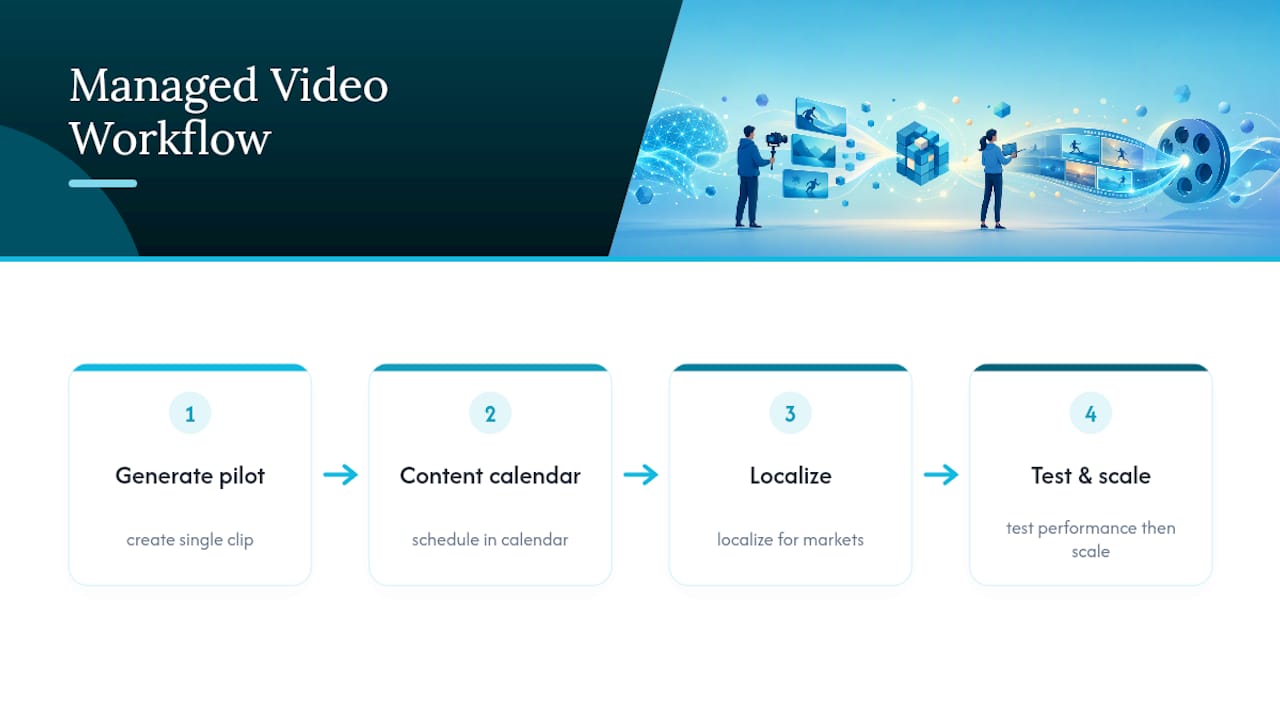
At scale, the tool matters less than the pipeline around it. Teams running AI video production typically follow a pattern: generate a pilot clip, slot it into a content calendar, localize it for target markets, then test how it performs before scaling the format across a wider release.
The operational tradeoffs are real. Someone has to handle quality control on every batch, keep brand voice consistent across dozens of clips a month, hold to a publishing cadence, and run legal review on anything involving a real person’s likeness. That workload adds up fast once you’re producing more than a handful of clips weekly, and it’s exactly where a managed marketing approach tends to outperform a solo creator juggling five browser tabs.
None of this replaces good judgment on brand fit. AI video generation is a production tool, not a strategy, and the creators who benefit most treat it that way.
— Gjon
Generating clips is the easy part. Turning that content into consistent revenue, day after day, across every platform your fans check, is the part most creators run out of hours for. Only-dreams handles that operational load: dedicated account managers, a trained chat team that builds real fan relationships instead of copy-paste replies, and data-driven marketing across Instagram, TikTok, and beyond.
If you’re a creator already producing $3,000 or more a month and starting to feel stretched between content creation, chat responses, and marketing strategy, that’s the exact point where a managed team pays for itself. Only-dreams also offers AI-enhanced marketing as an add-on, so you keep the speed of AI video generatoren tools while offloading the fan engagement and revenue optimization work that actually eats your week. Our creator marketing resources walk through how AI and managed support work together rather than competing for your attention.
Ready to see what a managed account setup looks like for your business? Get in touch with Only-dreams and find out where your current workflow is leaving revenue on the table.