Pay-per-view (PPV) on OnlyFans is locked content — a post, direct message, or live stream — that fans pay a one-time price to unlock, separate from any subscription fee. To create one, attach your media to a post or message, toggle the PPV lock, set your price, write a preview caption, and publish or send. That’s the whole mechanic.
A few things worth knowing before you dive into the setup section:
Pro Tip: If you’re just starting out and unsure whether to charge a subscription, consider running a free account with PPV-only monetization first. It lowers the barrier for new fans and lets your content quality do the selling.
The sections below walk through setup step by step, then cover pricing, targeting, safety, and when to bring in professional support.
Segmenting fans by spend behavior and personalizing PPV offers is the single most reliable way to increase unlock rates and average revenue per fan.
| Point | Details |
|---|---|
| Choose the right format | Use PPV messages for personalized offers, posts for high-production content, and ticketed streams for live events. |
| Test pricing systematically | Run three price points across equal fan segments and optimize for revenue per exposed fan, not raw conversion rate. |
| Segment before every send | Prioritize past spenders, then frequent engagers; hold off on PPV for new or dormant subscribers until they re-engage. |
| Protect content proactively | Watermark all PPV media, deliver high-value content via DM, and keep OnlyFans’ reporting tools ready. |
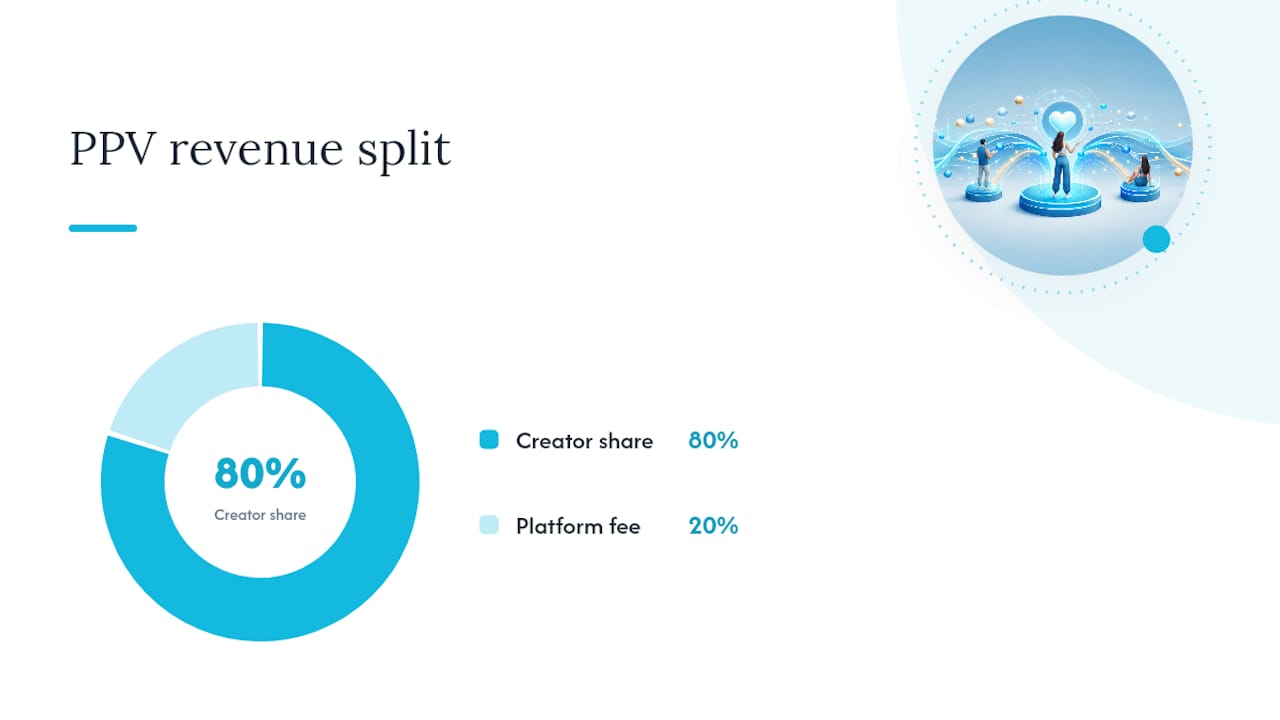
| Creators keep 80% of PPV revenue | OnlyFans takes a 20% platform fee on every unlock; track gross, fee, and net payout for each sale. |
| Only-dreams scales PPV operations | Only-dreams provides 24/7 chat management, segmentation, and analytics to grow PPV revenue without adding creator workload. |
Before you can receive any PPV revenue, your account needs to be verified. OnlyFans requires government-issued ID verification and a connected payout method (bank account or supported e-wallet) before funds can be released. Get those in place first.
The OnlyFans features guide confirms the platform’s built-in price control lets you lock any post or message with a single toggle, and you can target individual fans, selected groups, or your full subscriber list.
Mass messaging with a PPV lock is one of the most direct revenue tools on the platform. You can filter recipients by subscription tier or send to a manually selected list, which is where segmentation starts to matter.
Official OnlyFans guidance recommends reserving PPV for exclusive content not posted elsewhere on your profile. Reposting the same content as a paid post that fans already saw for free trains your audience to wait rather than pay. Keep PPV genuinely exclusive and your conversion rates will reflect it.
— OnlyFans creator center
Pro Tip: Your preview image and caption are your sales page. Use a high-quality cropped thumbnail that shows just enough to create curiosity, and write a caption that names the specific value — “12-minute exclusive set, never posted anywhere else” beats “new content drop” every time.
Each PPV format reaches fans differently, and choosing the wrong one for your content type costs you conversions.
| Format | Reach | Intimacy | Best price range | Ideal use case |
|---|---|---|---|---|
| PPV post | All subscribers + profile visitors | Low | $5–$25 | High-production photo sets, cinematic video |
| PPV message | Targeted list or all subscribers | High | $10–$50+ | Personalized clips, custom requests, direct offers |
| Ticketed stream | All subscribers + promoted externally | Medium | $5–$30 | Live Q&As, interactive events, limited-capacity experiences |
A few practical distinctions:
The OnlyFans creator center explains the controls for each format and notes that PPV messages give creators the most granular targeting options of the three.
Pricing is the variable most creators set once and never revisit. That’s a mistake. Your optimal price point depends on your audience’s spending history, the content type, and how you frame the offer.
Practical pricing rules:
The OFM Glossary describes PPV as a major revenue lever that often outperforms subscription income when paired with consistent pricing experiments and segmentation.
Pro Tip: Never price based on how long the content took to make. Price based on what your specific audience has demonstrated they’ll pay. Check your past PPV unlock rates before setting a new price — your own data is the most reliable guide you have.
The content types that sell most reliably as PPV share one trait: they feel genuinely exclusive and unavailable anywhere else.
High-converting PPV content categories:
For PPV messages, your hook text is everything. The fan sees it before they decide to pay. Here are two short templates you can adapt:
Both follow the same structure: emotional hook, specific value statement, clear deadline or scarcity signal. Keep the message body under three sentences. Longer messages get skimmed; shorter ones get acted on.

On preview thumbnails: crop to the most visually compelling frame, not the most explicit one. The goal is curiosity, not full disclosure. A fan who feels like they’re missing something is more motivated than one who already knows what they’re getting.
Quality matters more than frequency. Two high-production PPV posts per month will typically outperform eight rushed ones. Your audience’s willingness to pay is tied directly to their trust that your content is worth it.
Sending the same PPV to every subscriber is the single most common reason PPV underperforms. Business Insider’s reporting notes that OnlyFans has no native discovery algorithm, meaning PPV is a conversion tool for fans you already have, not a growth channel. That makes targeting your existing audience precisely the only lever that matters.
Segmentation framework:
Sequencing a PPV offer:
Before sending, check these metrics for each segment:
Pro Tip: Use purchase history to protect your ROI. Fans who have never unlocked a PPV and haven’t responded to messages in 60 days have a very low conversion probability. Sending them repeated PPV offers doesn’t just waste a send — it trains them to ignore your messages. Remove them from PPV campaigns until you’ve re-engaged them through free content first.
For deeper message scripting and conversion benchmarks, the chatting strategies guide covers sequencing in detail.
OnlyFans takes 20% of all creator earnings, including PPV unlocks. Creators keep 80% of their gross revenue, whether that comes from subscriptions, tips, or pay-per-view sales. That split applies uniformly across all PPV formats.
Payouts are processed on a rolling basis after a holding period (typically seven days for new accounts, shorter for established ones). You need verified ID and a connected payout method before any funds are released, as confirmed by OnlyFans’ start guide.
Recommended bookkeeping fields for each PPV sale:
| Field | What to record |
|---|---|
| Date | Transaction date |
| Fan ID | Anonymized fan identifier |
| Content ID | Post or message ID |
| Gross sale | Full unlock price paid by fan |
| Platform fee | 20% of gross |
| Net payout | 80% of gross |
| Payout batch ID | OnlyFans payout reference number |
Tracking at this level lets you reconcile your OnlyFans earnings statement against your bank deposits and identify which content types generate the most net revenue per send.
Tax note: PPV income is taxable in most jurisdictions. The specifics vary by country, entity type, and income level. Consult a local accountant or tax advisor to confirm your reporting obligations before filing.
Content leakage is a real risk on any platform where digital media can be screenshotted or screen-recorded. No technical measure eliminates it entirely, but you can reduce exposure and respond faster when it happens.
Common leakage vectors:
Practical mitigations:
Pro Tip: If content leaks, follow this sequence: (1) Screenshot the leak with URL and timestamp as evidence. (2) File a DMCA takedown request with the hosting platform. (3) Report to OnlyFans support with your evidence. (4) Send a brief, calm message to your subscribers acknowledging the situation if it’s widely visible — transparency builds loyalty faster than silence does.
Most PPV underperformance comes down to a handful of fixable mistakes. Here’s what goes wrong and what to do about it.
“The number one PPV mistake isn’t pricing too high — it’s sending the right content to the wrong fans.”
This is the consensus from experienced creators and agency teams: poor segmentation kills conversion before the content even gets a chance.
Common mistakes and quick fixes:
Technical troubleshooting checklist:
Creator forums consistently flag the reinforcement message as one of the highest-ROI adjustments a creator can make after the initial send.
Managing PPV well at scale — segmenting fans, writing message copy, tracking analytics, running pricing tests — takes more time than most solo creators have. There’s a point where the opportunity cost of doing it yourself exceeds the cost of professional help.
Decision checklist: is it time to hire agency support?
What agencies typically handle for PPV:
Questions to ask before signing with any agency:
For a side-by-side look at agency models and what established creators should expect, the OnlyFans management agency comparison is a useful reference. And before you sign anything, review the agency red flags guide — it covers the contract terms and operational practices that signal a bad fit.
| Agency service | Solo creator | With agency support |
|---|---|---|
| Fan segmentation | Manual, time-intensive | Automated + team-managed |
| PPV message copy | Written by creator | Dedicated copywriting team |
| Analytics and pricing tests | Occasional, ad hoc | Continuous, data-driven |
| Social media promotion | Creator-managed | Cross-platform strategy team |
| Chat coverage | Limited to creator’s hours | 24/7 coverage |
The creators who consistently earn the most from pay-per-view content share one habit: they treat every PPV send as a targeted offer, not a broadcast. Segmenting by spend behavior, personalizing the hook, and following up once — those three steps alone separate the top earners from creators who send the same locked post to everyone and wonder why conversion is low.
Only-dreams works directly with creators to build exactly this kind of system: segmented campaigns, trained chat teams, and analytics that show which content and price points are actually working. The mechanics of PPV are simple; the execution at scale is where most creators need support.
Only-dreams gives established creators a dedicated team that handles the operational side of PPV so you can focus on making content. The concrete difference: instead of spending two-plus hours a day on segmentation, message writing, and analytics, you get a trained chat team running targeted PPV campaigns around the clock, a dedicated account manager tracking unlock rates and adjusting pricing, and data-driven social media promotion across Instagram, TikTok, and Threads to keep new fans entering your funnel.
The services most relevant to PPV growth include fan segmentation and campaign planning, message copywriting and A/B testing, UTM tracking to measure which off-platform channels actually convert, and 24/7 chat coverage so no unlock window gets missed. Only-dreams operates on a revenue share model, meaning the agency’s incentives are directly aligned with your earnings growth.
If your PPV revenue has plateaued or you’re ready to scale without adding more hours to your day, book a consultation with Only-dreams to see what a managed PPV strategy looks like for your account.
Official documentation and high-quality external resources to consult alongside this guide: