TL;DR:
- Automating, batching, and delegating tasks can significantly reduce creator workload and increase efficiency. Effective workflows involve visibility, targeted automation, and focused scheduling to sustain consistent content output. Human oversight remains essential to maintain quality and brand voice in AI-assisted content creation.
Creator workload reduction is defined as the systematic removal of repetitive, mechanical tasks from a creator’s production process through automation, batching, and delegation. Without a structured system, a full-time content production schedule can exceed 35–45 hours per week manually. That number is a production problem, not a motivation problem. The good news is that structured workflows can cut video production time by about 38%, saving creators roughly 300 hours every year. This guide covers the exact methods to reduce creator workload in 2026 without sacrificing the quality your audience expects.
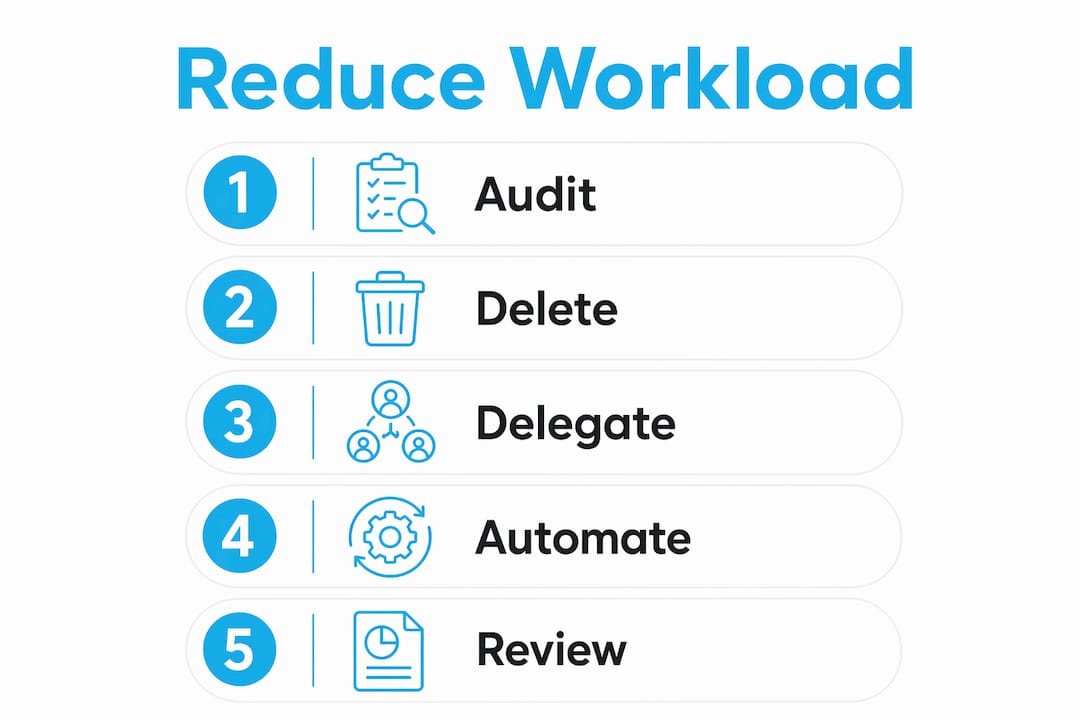
The foundation of any workload reduction system is visibility. You cannot fix what you cannot see. Experts recommend auditing your workflow first to identify invisible time drains like format conversions, metadata entry, and caption formatting, which can consume 15–20% of your weekly effort. Once you see where the time goes, you can act on it.
The five core components of effective workload reduction are:
Pro Tip: Apply the delete-delegate-automate filter in that order. Delete any task that adds no value, delegate what requires a human but not you specifically, and automate what is purely mechanical.

AI tools work best as an operations co-pilot, not a replacement for your creative voice. The rule is simple: automate only mechanical tasks, not creative ones. Your personality, storytelling instincts, and brand voice stay in human hands. Everything else is a candidate for automation.
Here is a practical breakdown of which tasks to automate and which to protect:
| Task | Automate or protect? | Notes |
|---|---|---|
| Rough cut editing | Automate | AI tools can trim silence and cut dead air in minutes |
| Caption generation | Automate | Always review for accuracy before publishing |
| Thumbnail resizing | Automate | Template-based tools handle platform specs instantly |
| Script ideation | Protect | AI can suggest angles, but your voice must shape the final draft |
| Final edit review | Protect | Human quality gates prevent generic, flat content |
| Fan messaging | Protect or delegate | Requires authentic tone; trained teams outperform bots |
The biggest risk with AI in content creation is what the industry calls “AI slop.” This is content that sounds generic, lacks personality, and erodes audience trust over time. AI tools require human oversight to maintain quality and brand voice. A practical quality gate is to review every AI-assisted output before it goes live, even if that review takes only five minutes.
Managing costs matters too. Start with one or two AI tools that solve your biggest time drain. Adding five tools at once creates a new kind of overhead. For creators looking to go further, AI-enhanced marketing can extend your reach without adding hours to your week.
Pro Tip: Set a weekly “AI audit” of 15 minutes to review what your tools produced. This keeps quality high and prevents drift from your brand voice.
Batching is the single most effective scheduling method for reducing creator burnout. The core principle comes from separating high-concentration creative work from low-concentration mechanical work into different sessions. Your brain operates differently during creative ideation versus repetitive editing. Mixing the two in the same session drains both.
Industry frameworks recommend a three-day production cycle:
This structure lets creators maintain 5–7 uploads per week within a focused 8–12 hour total work week. That is a dramatic shift from the 20–30 hours many creators spend when they work reactively.
A content buffer is the other piece most creators skip. Producing one to two weeks of content ahead of schedule gives you recovery days without breaking your posting cadence. Recovery days are not optional. They are what make the system sustainable.
Key scheduling habits that protect your output:
For a deeper look at building this kind of system, the creator business operations workflow guide covers how to structure production from the ground up.
Delegation is the fastest way to recover hours without changing your creative output. Outsourcing editing tasks alone can redirect up to 1,170 annual hours back to you. That is time you can spend creating, resting, or building new revenue streams.
The highest-leverage areas to delegate first are:
Finding qualified help starts with clear documentation. Before you hire anyone, write a one-page brief that covers your brand voice, content standards, and turnaround expectations. This brief becomes your onboarding document. Run a paid trial project before committing to a long-term arrangement. A trial reveals whether someone can match your standards before you invest in training them.
Pro Tip: Build a feedback loop from day one. Review delegated work weekly for the first month, then move to spot-checks. Consistent feedback early prevents quality drift later.
For creators who want a full-service approach to outsourcing creator operations, working with a professional management agency removes the hiring and training burden entirely.
Reducing creator workload requires three things working together: a documented workflow, targeted automation of mechanical tasks, and consistent delegation of non-core work.
| Point | Details |
|---|---|
| Audit before automating | Identify tasks consuming 15–20% of weekly effort before choosing tools. |
| Automate mechanical tasks only | Protect creative judgment; automate captions, rough cuts, and scheduling. |
| Batch into a three-day cycle | Separate ideation, filming, and editing days to cut context switching. |
| Delegate editing and admin | Outsourcing editing can recover up to 1,170 hours annually for creators. |
| Build a content buffer | Produce one to two weeks ahead to protect consistency and allow recovery. |
The creators I see burn out fastest are not the ones working the hardest. They are the ones working without a system. Every hour they spend on format conversions or inbox management is an hour that could go toward content that actually grows their audience. The problem is almost never effort. It is inefficiency made invisible by habit.
The most practical advice I can give is to start with one systemized step, not five. Pick the task that costs you the most time and feels the least creative. Document it, then automate or delegate it. Get that working before you touch anything else. Creators who try to overhaul everything at once usually end up with a more complicated mess, not a simpler one.
AI is genuinely useful as an operations co-pilot. I have seen it cut production overhead significantly when applied correctly. But the moment you let it touch your creative voice without a human review gate, quality drops fast. The audience notices before you do. Keep AI on the mechanical side of the workflow and keep your editorial judgment firmly in place.
The goal is not to produce more content. The goal is to produce consistent content without destroying yourself in the process. Sustainable output over 12 months beats a sprint followed by a three-month burnout every time. Build the system first. The growth follows.
— Gjon
Reducing your workload is not just about working fewer hours. It is about putting your time where it actually generates revenue.
Only-dreams handles the operational side of your creator business so you can stay focused on content. From 24/7 fan chat management and revenue optimization to data-driven marketing across Instagram and TikTok, the agency takes on the tasks that drain your time without growing your income. Only-dreams also offers AI-enhanced marketing as an add-on, giving creators a real edge in reach without adding hours to their week. If you are ready to build a more efficient creator business, explore what Only-dreams offers and see how professional account management changes the math.
Creator workload reduction is the process of removing repetitive, mechanical tasks from a creator’s production workflow through automation, batching, and delegation. The goal is to maintain consistent content output while spending fewer total hours on production.
Creators using structured batching and AI-assisted automation report 50–70% reductions in time spent on repetitive tasks. Structured workflows alone can save roughly 300 hours per year.
Final editorial review, creative ideation, and fan messaging that requires an authentic personal tone should stay in human hands. AI tools require human oversight to prevent generic, low-quality output.
Start by filming two days of content in one session. Once that feels manageable, extend to a full week. Industry frameworks show that a three-day production cycle can sustain 5–7 uploads per week within 8–12 total work hours.
Hire help when a task requires consistent human judgment, such as editing for tone or managing fan relationships. Use AI tools for purely mechanical work like caption generation, thumbnail resizing, and scheduling.