
TL;DR:
- Effective chat management involves creating a structured workflow with clear team roles and performance metrics. It emphasizes rapid responses, personalized canned replies, and ongoing organization of channels to maintain fan engagement. Regularly tracking response time, resolution rate, and fan engagement helps creators build stronger connections without burnout.
Step by step chat management is the systematic process of organizing, executing, and refining chat conversations to maximize responsiveness, clarity, and fan engagement. For content creators and community managers, it means building a repeatable workflow that handles high message volumes without sacrificing the personal touch fans expect. The industry standard for initial response time sits under 60 seconds during active hours. Miss that window consistently, and fan loyalty erodes fast. This guide walks you through every phase of effective chat management, from setup to performance tracking, so you can build a system that scales with your growth.
Solid chat management starts before you type a single reply. The right tools and team structure determine whether your workflow holds up under pressure or falls apart at volume.
Your chat platform needs to support four core capabilities: live chat with real-time delivery, message threading for context, user role assignments, and a monitoring dashboard. Without role assignments, you cannot separate agents from supervisors. Without a dashboard, you cannot spot problems before they escalate. Platforms that lack these features force you to manage by memory, which fails at scale.
Define your channels before you invite anyone. Separate announcements from support, and keep operations traffic in its own space. Functional channel architecture reduces notification fatigue and keeps every conversation in the right place. Mixing channel purposes is the fastest way to bury important decisions in irrelevant noise.
Your backend needs fallback mechanisms. If your chat system goes down during peak hours, fans do not wait. They leave. Reliable uptime and a stable message delivery layer are non-negotiable prerequisites for any professional chat operation.
Before going live, assign three roles clearly:
Every person on your team should know their role before the first message arrives. Ambiguity in team structure creates slow responses and dropped conversations.
Organizing your chat channels is not a one-time setup task. It is an ongoing discipline that keeps your communication clear as your fan base grows.

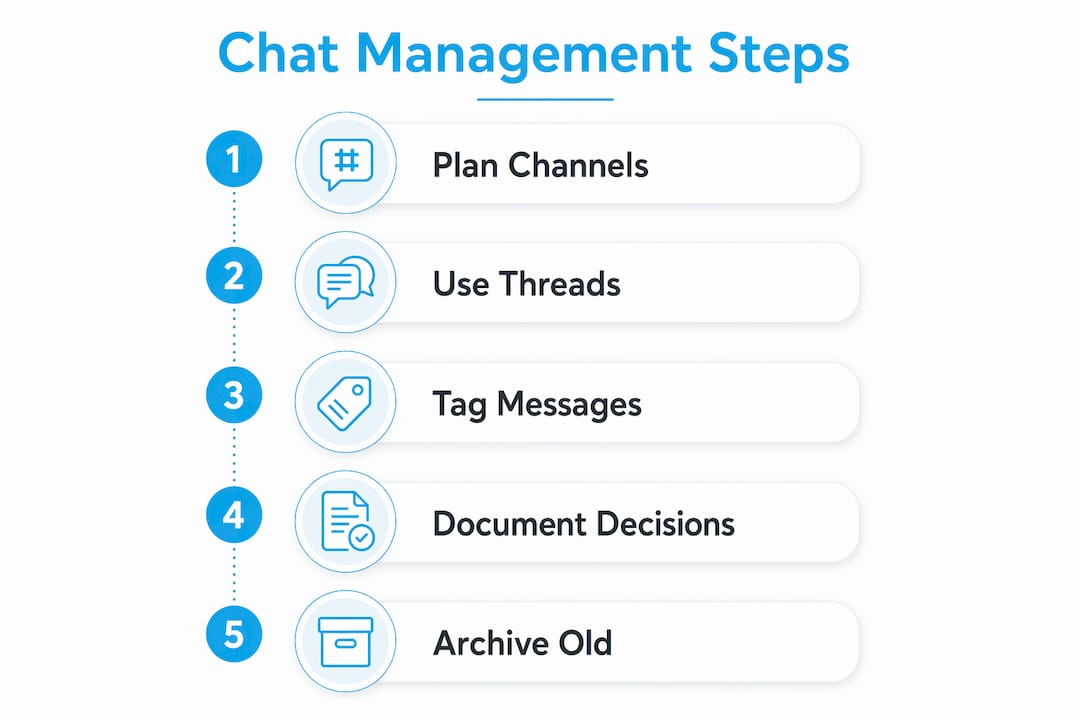
Step 1: Plan functional channels with pinned guidelines. Each channel needs a single, defined purpose. A channel called “general” serves no one well. Name channels by function: fan support, content feedback, VIP messages. Pin a short guideline at the top of each channel so every team member knows what belongs there.
Step 2: Use threads for context, but summarize in the main channel. Threads are useful for keeping detailed back-and-forth contained. The problem is that decisions buried in threads get lost. After any thread that produces a decision or next step, post a one-sentence summary in the main channel. That summary is what your team will actually find later.
Step 3: Tag messages by type. Message tagging with prefixes like DECISION or ACTION separates discussion from outcomes. When a supervisor scrolls back through a channel, tagged messages surface the things that matter. Untagged channels look like noise.
Step 4: Build a documentation system of record. Every decision and assigned task needs to live somewhere outside the chat. Link your chat outcomes to a shared document, a task tracker, or a project board. Chat logs are not documentation. They are a starting point.
Pro Tip: Archive inactive channels every 30 days. Channels that no one uses still generate visual clutter and distract your team from active conversations.
Keeping your channel structure lean is one of the most underrated parts of a strong chat management guide. More channels do not equal better organization. They equal more places for things to get lost.
Execution is where most chat workflows break down. Good structure means nothing if your team cannot perform under real-time pressure.
Aim for a first response under 60 seconds during active hours, and push toward 30 seconds when volume allows. Fans who wait longer than a minute for a reply during a live session feel ignored. That feeling translates directly into unsubscribes and reduced pay-per-view purchases.
Build a library of 10 to 15 personalized canned responses for your most frequent fan questions. The key word is personalized. A canned response that starts with the fan’s name and references their specific question feels human. A generic copy-paste feels like a form letter. Agents should always edit the first line of any canned response before sending.
AI handles routine routing well, but fans on creator platforms are paying for a personal connection. Use automation to sort and prioritize incoming messages. Use your agents to actually hold the conversation. The moment a fan feels like they are talking to a machine, the relationship weakens.
Supervisors can silently join chats or take over in real time, turning a frustrated fan interaction into a retention opportunity before it becomes a cancellation.
Keyword alerts set to trigger on phrases like “cancel,” “refund,” or “complaint” give supervisors the signal they need to step in early. The whisper feature lets a supervisor coach an agent mid-conversation without the fan seeing the guidance. That combination of monitoring and real-time coaching is what separates a professional chat operation from an ad hoc one.
Do not wait for a fan to escalate before you notice a problem. Monitor sentiment patterns across your chat volume. A cluster of short, clipped replies from fans in a single hour often signals a content or delivery issue worth investigating immediately.
Even well-built chat systems run into problems. Knowing the most common failure points lets you fix them before they affect your fans.
Technical glitches from poor message handling. Strict JSON serialization prevents the most common chat system errors, including message duplication and the “[object Object]” display bug that appears in logs when data is serialized incorrectly. If your platform shows garbled messages or duplicate entries, the fix almost always lives in the message schema layer.
Notification fatigue from too many channels. Every channel you create is a channel your team has to monitor. Limiting your channel count and archiving inactive ones keeps attention focused. A team that monitors five active channels performs better than one spread across twenty.
Robotic canned responses that kill engagement. Fans notice when a reply feels templated. Rotate your canned responses regularly and require agents to personalize the opening line every time. A human conversational tone is not optional on creator platforms. It is the product.
Pro Tip: Review your communication charter every quarter. Response time expectations, escalation paths, and channel purposes all shift as your fan base grows. A charter that made sense at 500 fans may not work at 5,000.
Track three metrics consistently to measure your chat workflow’s health:
These three numbers tell you where your system is working and where it needs attention. Reviewing them weekly gives you enough data to make real adjustments without drowning in reports.
Effective chat management for creators requires a structured workflow, defined team roles, and consistent performance tracking to build lasting fan relationships.
| Point | Details |
|---|---|
| Response time is non-negotiable | Aim for a first reply under 60 seconds to keep fans engaged and reduce drop-off. |
| Channel structure drives clarity | Define each channel by function and archive inactive ones every 30 days to reduce noise. |
| Canned responses need personalization | Build 10–15 templates and always edit the first line to avoid a robotic tone. |
| Supervisors protect high-value chats | Use whisper and takeover features with keyword alerts to intervene before fans disengage. |
| Track three core metrics weekly | Monitor response time, resolution rate, and fan engagement rate to spot and fix problems fast. |
By Gjon
Most chat management advice focuses on speed. Get the reply out fast, close the ticket, move on. That mindset works in a customer service call center. It does not work in a fan community where the relationship is the product.
What I have seen consistently is that creators who treat chat as a sales funnel, rather than a support queue, build significantly stronger retention. Every message is a chance to deepen a fan’s connection to the creator. That requires agents who understand the creator’s voice, not just the platform’s features. Training your chat team on tone and personality is as important as training them on response time.
The other thing most guides miss is the cost of over-automation. AI routing is genuinely useful for sorting volume. But the moment a fan receives two consecutive replies that feel automated, the trust erodes. I recommend a simple rule: any conversation that goes beyond three exchanges should have a human agent actively shaping the tone, even if automation handled the first reply.
Scaling chat management also means accepting that your system will need to change. What works at launch will not work six months later. Build in a quarterly review of your channel structure, your canned response library, and your escalation paths. Treat it like a content calendar, something you plan, execute, and revise on a schedule. Creators who do this consistently are the ones who grow their fan engagement without burning out their teams.
— Gjon
Only-dreams works with established content creators who want professional chat management without building an in-house team from scratch.
Only-dreams provides trained chat agents who understand creator voice, fan psychology, and revenue-focused communication. The team handles 24/7 message coverage, so no fan message goes unanswered during off-hours. Creators who work with Only-dreams report more consistent fan engagement and higher messaging revenue without adding hours to their own workload. If you are ready to put a professional system behind your fan conversations, explore what Only-dreams offers and see how the agency’s chat strategies translate directly into creator income.
Step by step chat management is the process of organizing, executing, and refining fan conversations through defined workflows, team roles, and performance tracking. It gives creators a repeatable system for handling high message volumes without losing the personal connection fans expect.
The industry standard for first response time is under 60 seconds during active hours, with some platforms recommending as low as 30 seconds. Faster responses directly reduce fan drop-off and increase engagement.
Fewer than you think. Structuring channels by function and limiting total channel count reduces notification fatigue and keeps your team focused on conversations that matter.
Use both, but assign them different jobs. AI handles routing and sorting; human agents handle the actual conversation. Maintaining a human tone is critical on creator platforms where fans are paying for personal connection.
Track response time, resolution rate, and fan engagement rate on a weekly basis. These three numbers give you a clear picture of where your chat workflow is performing and where it needs adjustment.